 FierceSpeed

Basketball and soccer · Available on the web
Subs
Fair minutes. Better games.
Keep your attention on the game.
Subs helps coaches organise their team, plan balanced playing time and know exactly who goes on and who comes off. Choose the players who are there today, make a rotation and follow it from the sideline.
Want to have a look first? Open Subs and choose Explore a local demo. You can try the sample basketball and soccer teams without an account. Demo changes stay on your device.
From team list to tip-off.
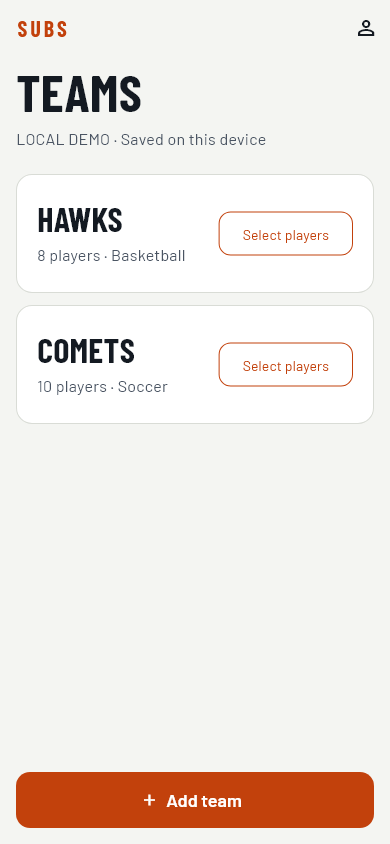
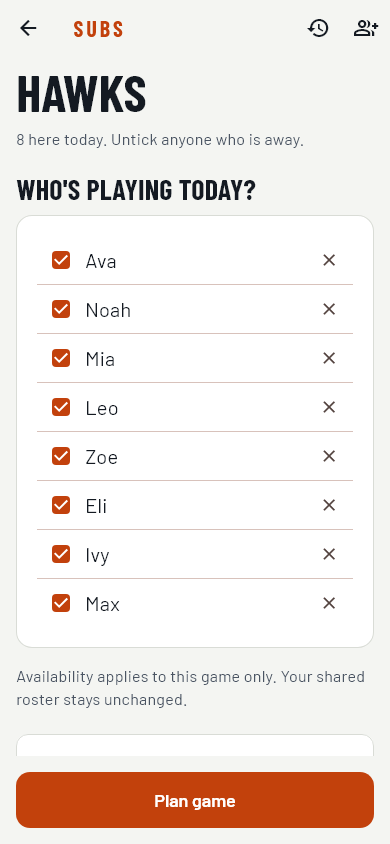
- Select today's players. Add your team and roster, then choose Select players. Untick anyone who is away before choosing Plan game. Attendance is for that game; the team roster stays intact.
- Make the rotation. Set game length in one-minute increments, the substitution interval, how many players swap and how many are on the court or field. Use the automatic order or choose your starters and bench order.
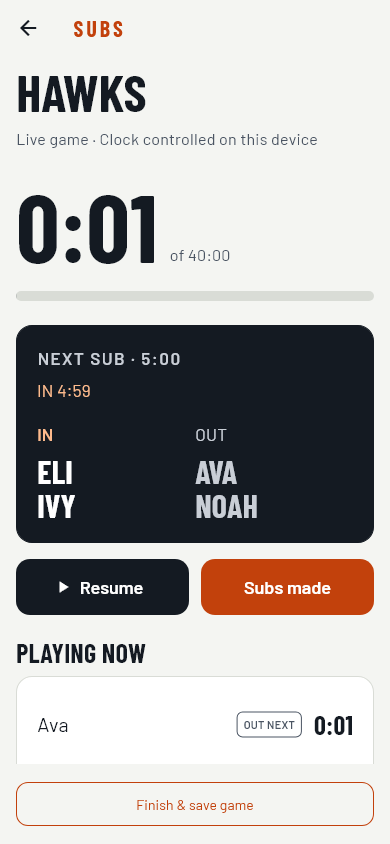
- Run the game. Follow the live clock and clear IN/OUT calls. Pause/Resume and Subs made sit together in the main controls. Confirm each change when it happens so playing minutes reflect the actual timing.
- Review the result. Finish and save the game to look back at playing time in the team's history.
A look inside Subs
App screens from the local demo with fictional teams and players. Select an image to view it at full size.
Use the device you bring to the game.
Open Subs in a browser on your phone, tablet or computer. Where your browser supports it, add Subs to your home screen for quick access. Keep the live game on the device controlling the clock.
Subs plans towards balanced playing time and shows the planned minutes before you start. The live game records actual time, including early or late substitutions and pauses.
Got a question or an idea?
Tell me what would make game day easier for your team.